The Quick Actions section allows admins to perform remote actions on an individually selected enrolled device directly from the Quantem Console — without physical access to the device.
How to Access
Log in to the Quantem Console
From the left navigation, click Manage
Click on Device
Select the device you want to perform an action on
In the device detail page, click on Quick Actions from the left-side menu
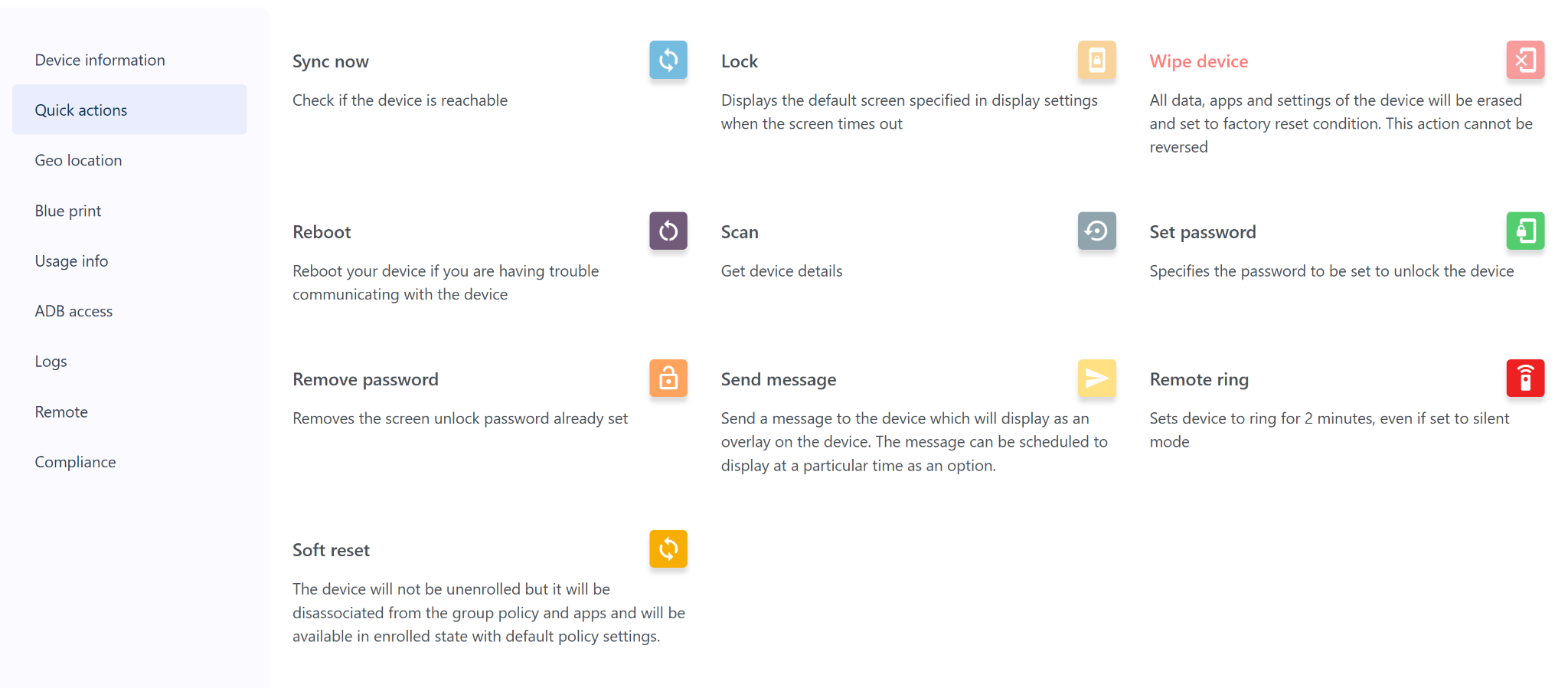
A list of all available remote actions will be displayed.
Available Quick Actions
Notes
Wipe Device is an irreversible action. Always confirm before initiating a wipe. Once triggered, all data on the device will be permanently erased.
Soft Reset does not unenroll the device — it only removes the group, policy, and app associations. The device remains in an enrolled state.
Send Message supports scheduling, allowing admins to set a specific time for the message to appear on the device.
Remote Ring is useful for locating a misplaced device even when it is on silent mode.
Sync Now can be used to verify device reachability before performing other actions.
Was this article helpful?
That’s Great!
Thank you for your feedback
Sorry! We couldn't be helpful
Thank you for your feedback
Feedback sent
We appreciate your effort and will try to fix the article