The Bulk Device Actions feature in the Quantem Console allows admins to perform a single remote action simultaneously on multiple selected devices, saving time in large-scale device management operations.
How to Access
Log in to the Quantem Console
From the left navigation, click Manage
Click on Device
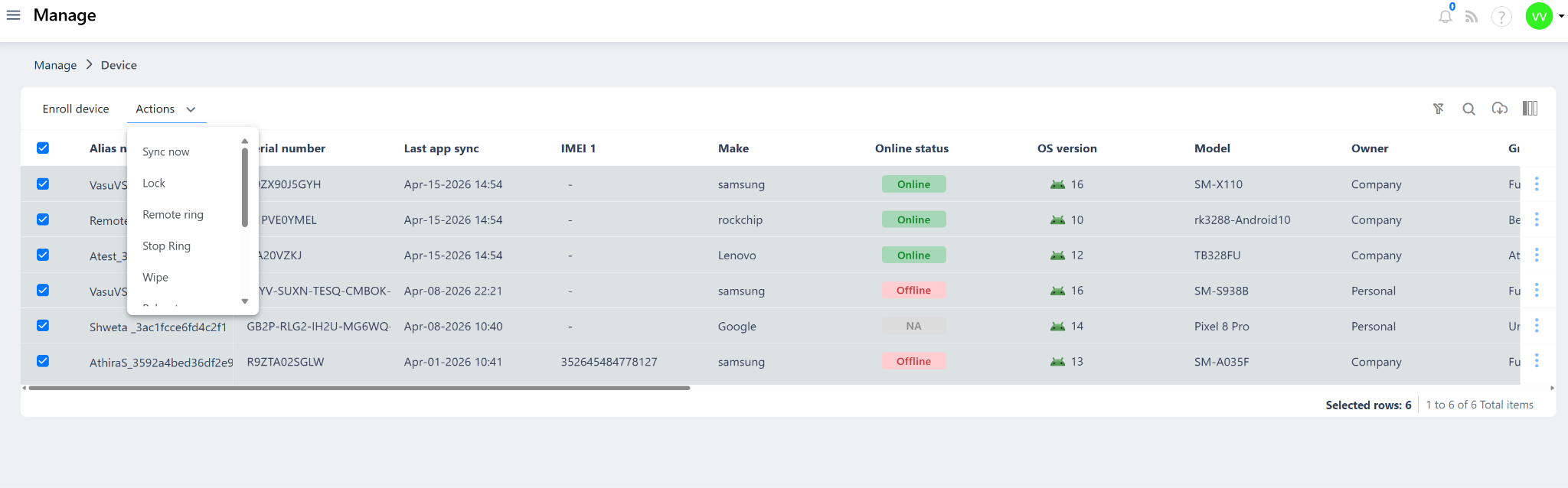
Select one or more devices using the checkboxes on the left of each device row
Use the top checkbox to select all devices at once
Click on the Actions dropdown at the top of the device list
Select the desired action from the dropdown menu
The bottom-right of the screen will display "Selected rows: X" confirming how many devices are selected before performing the action.
Available Bulk Actions
Note
Wipe is an irreversible action. Always double-check selected devices before initiating a bulk wipe.
Soft Reset does not unenroll devices — it only removes group, policy, and app associations.
The "Selected rows" count at the bottom-right confirms the number of devices the action will apply to.
Bulk actions apply to all selected devices simultaneously — including Offline devices, which will execute the action once they reconnect and sync.
Was this article helpful?
That’s Great!
Thank you for your feedback
Sorry! We couldn't be helpful
Thank you for your feedback
Feedback sent
We appreciate your effort and will try to fix the article