The Device Information section provides a comprehensive view of a selected device's telemetry data — including hardware specs, storage, memory, battery, installed apps, network details, and online/offline history — all from within the Quantem Console.
How to Access
Log in to the Quantem Console
From the left navigation, click Manage
Click on Device
Select the device you want to view
Click on Device Information from the left-side menu
The device telemetry will be displayed across the following sub-sections:
General
Hardware
Software
Network
Online/Offline
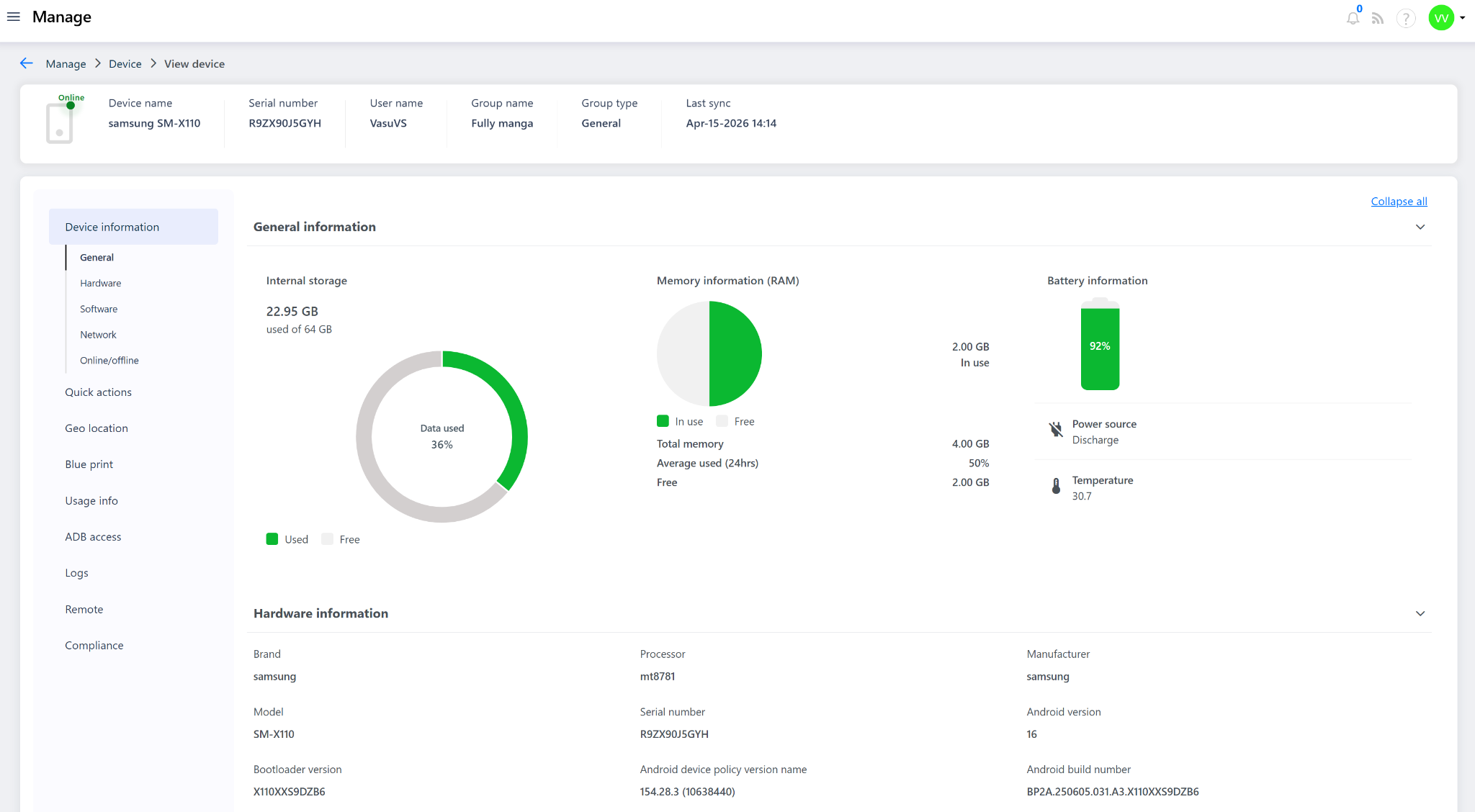
1. General Information
Provides a quick visual overview of the device's current resource usage:
Field | Description |
Internal Storage | Total and used storage on the device (e.g., 22.95 GB used of 64 GB — 36% data used) |
Memory (RAM) | Total RAM, amount in use, average used over 24hrs, and free memory (e.g., Total: 4 GB, In use: 2 GB, Free: 2 GB) |
Battery Information | Current battery percentage, power source status (Charging/Discharging), and device temperature (e.g., 92%, Discharge, 30.7°C) |
2. Hardware Information
Displays the core hardware and system details of the device:
Field | Description |
Brand | Device brand (e.g., Samsung, lenovo, etc) |
Processor | Chipset/processor model (e.g., mt8781) |
Manufacturer | Device manufacturer name (e.g., Samsung,etc) |
Model | Device model number (e.g., SM-X110) |
Serial Number | Unique hardware serial number (e.g., R9ZX90J5GYH) |
Android Version | OS version running on the device (e.g., Android 16) |
Bootloader Version | Bootloader version installed (e.g., X110XXS9DZB6) |
Android Device Policy Version | Version of Android Device Policy applied (e.g., 154.28.3 (10638440)) |
Android Build Number | Full build number of the OS (e.g., BP2A.250605.031.A3.X110XXS9DZB6) |
Device Kernel Version | Kernel version running on the device |
Update Status | OS update status (e.g., UP_TO_DATE) |
Security Patch Level | Date of the latest applied security patch (e.g., 2026-02-05) |
Enrollment Time | Date and time the device was enrolled into Quantem (e.g., Mar-06-2026 15:49) |
Last Status Report Time | Date and time of the most recent status update received from the device (e.g., Apr-15-2026 12:34) |
3. Software Information
Lists all applications installed on the device:
Field | Description |
Display Name | Name of the installed application (e.g., My Files, Storage Manager, Samsung Cloud) |
Package Name | Application package identifier (e.g., com.sec.android..., com.android.st...) |
State | Installation state of the app (e.g., INSTALLED) |
App Source | Origin of the app (e.g., System app, Play Store, Enterprise) |
Version | Installed version of the application (e.g., 15.4.02.3, 16, 5.6.07.17) |
Timestamp | Date and time the app was last synced or installed (e.g., Mar-06-2026 15:49) |
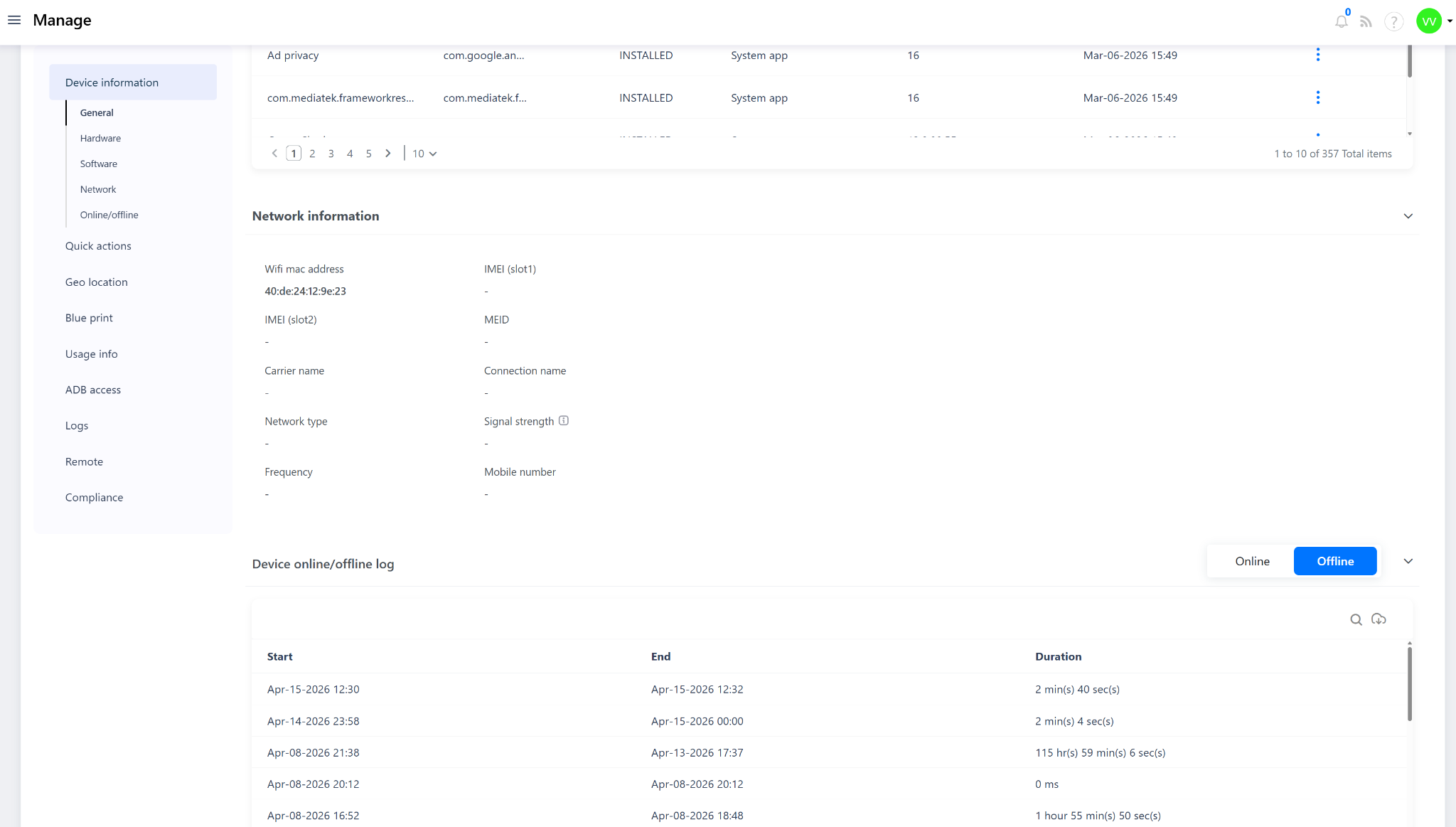
4. Network Information
Displays the device's current network and connectivity details:
Field | Description |
WiFi MAC Address | MAC address of the device's Wi-Fi adapter (e.g., 40:de:24:12:9e:23) |
IMEI (Slot 1) | IMEI of the primary SIM slot |
IMEI (Slot 2) | IMEI of the secondary SIM slot (if applicable) |
MEID | Mobile Equipment Identifier (for CDMA devices) |
Carrier Name | Name of the mobile network carrier |
Connection Name | Active network/APN connection name |
Network Type | Type of network connected (e.g., WiFi, LTE, 5G) |
Signal Strength | Current signal strength of the active network connection |
Frequency | Network frequency band in use |
Mobile Number | SIM mobile number associated with the device |
5. Online/Offline Log
Displays a historical log of the device's connectivity activity with toggle filters for Online and Offline events, allowing admins to track device availability over time.
Notes
All telemetry data shown is fetched based on the Global Sync Time configured under Admin Settings. More frequent sync intervals result in more up-to-date data.
The Software Information section lists all apps — including system apps, enterprise apps, and Play Store apps — installed on the device.
Fields displaying " - " indicate that the data is not available or not applicable for that device.
Last Status Report Time reflects the most recent time the device actively communicated its status back to the Quantem server.