The Factory Reset Restriction policy in the Quantem Console allows admins to prevent end users from manually performing a factory reset on a managed device. By enabling this restriction, the device user is blocked from physically resetting the device through device settings — preventing unauthorized decommissioning of managed kiosk devices. This is a critical security control for organizations deploying shared or dedicated kiosk devices in the field, retail, or public-facing environments.
Steps to Configure Factory Reset Restriction
Step 1: Navigate to Kiosk
From the left-hand navigation, click on Kiosk. All existing kiosk profiles will be listed.
Step 2: Create or Edit a Kiosk Profile
Create New — Click Create Kiosk to start a new kiosk profile
Edit Existing — Click the three-dot menu ( ⋮ ) on an existing kiosk row and select View/Edit Details
Step 3: Open Kiosk Settings
Inside the kiosk profile, click on Settings in the top-right corner of the kiosk profile screen.
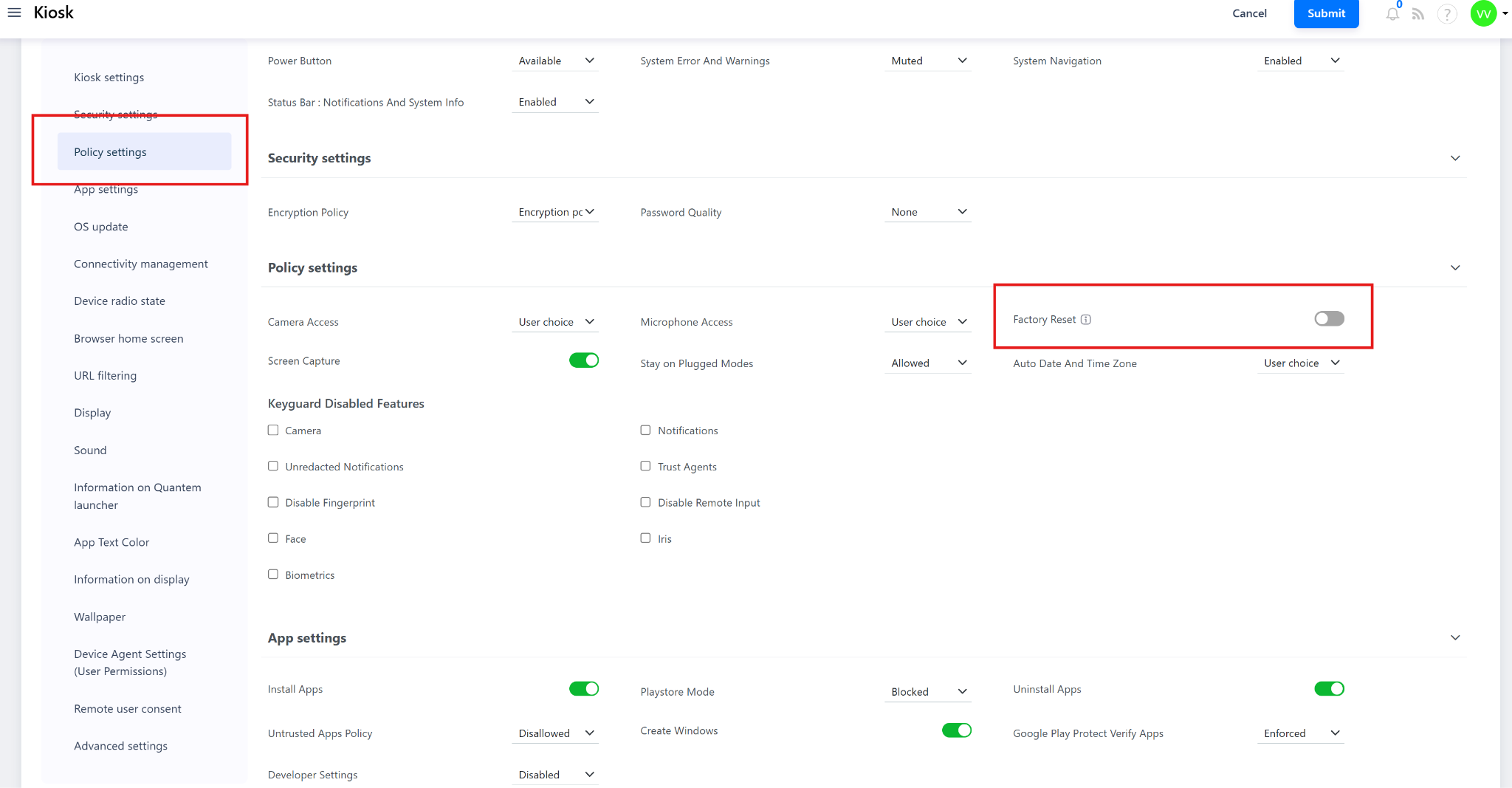
Step 4: Navigate to Policy Settings
In the Settings page, scroll down to locate the Policy Settings section.
Step 5: Configure Factory Reset Toggle
Under Policy Settings, locate the Factory Reset option. Configure the toggle as follows:
Step 6: Save the Kiosk Profile
After configuring the Factory Reset toggle, click Save to apply the configuration to the kiosk profile.
Step 7: Assign the Kiosk Profile
Assign the saved kiosk profile to the target device or group:
Assign to a Group — Navigate to Manage > Group, select the kiosk group, and assign the kiosk profile. All devices in the group will receive the factory reset restriction policy
Was this article helpful?
That’s Great!
Thank you for your feedback
Sorry! We couldn't be helpful
Thank you for your feedback
Feedback sent
We appreciate your effort and will try to fix the article